

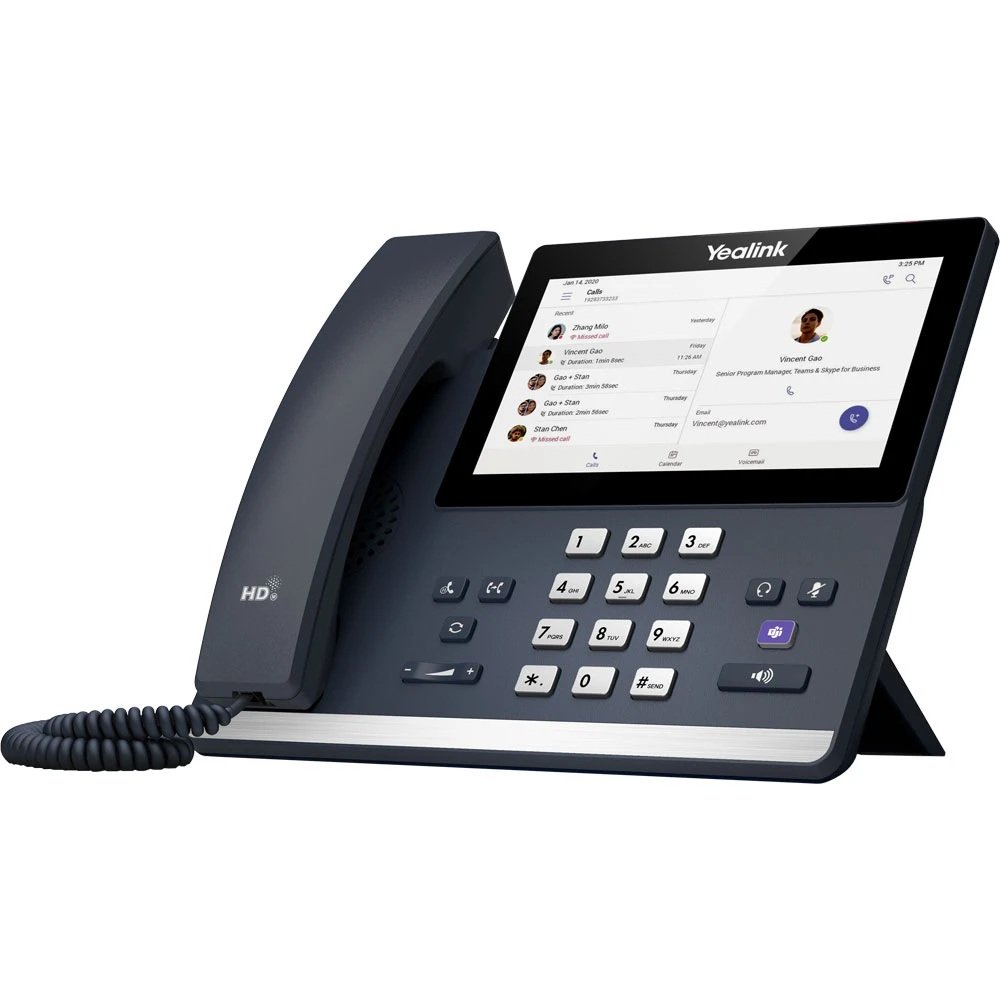
Yealink MP56 E2 High Quality
Yealink MP56 E2 عالي الجودة
Product Overview for Yealink MP56 E2 High Quality
The Yealink MP56 E2 High Quality IP Phone is a professional communication solution designed for modern offices, corporate environments, reception areas, customer service departments, and business workspaces. Built for Microsoft Teams-based communication, the Yealink MP56 E2 combines convenient call management, a user-friendly touchscreen interface, and advanced voice communication features to support efficient business operations. Its professional design makes it suitable for organizations that require reliable, clear, and organized communication throughout the working day.
The Yealink MP56 E2 is designed to simplify everyday business calling with intuitive controls and a dedicated Microsoft Teams experience. Users can manage calls, access contacts, navigate communication functions, and participate in business conversations through an easy-to-use interface. For companies upgrading their office telephone systems, this IP phone offers a practical solution for improving communication workflows and supporting employee productivity.
Key Features of Yealink MP56 E2 High Quality
1. Microsoft Teams Integration
The Yealink MP56 E2 is designed for Microsoft Teams communication, helping users access supported calling and collaboration functions directly from the phone. Its Teams-oriented interface makes it convenient for employees who already use Microsoft Teams as part of their daily business activities. This integration can help simplify communication management and reduce the need to switch between different devices for routine calling tasks.
2. User-Friendly Touchscreen Interface
The MP56 E2 features a touchscreen interface that provides convenient access to calling functions and supported communication options. The intuitive display helps users navigate menus, manage contacts, review call information, and access available features with minimal effort. This makes the phone suitable for busy offices where employees need quick and straightforward access to business communication tools.
3. Professional Voice Communication of Yealink MP56 E2 High Quality
Clear voice communication is essential for customer service, internal coordination, and professional meetings. The Yealink MP56 E2 is designed to support business voice calls using compatible IP telephony infrastructure. Its audio capabilities help users communicate with colleagues, customers, suppliers, and business partners in professional environments.
4. Efficient Call Management of Yealink MP56 E2 High Quality
The Yealink MP56 E2 supports everyday business calling requirements through its accessible call-management interface. Depending on the configured Microsoft Teams environment and supported software features, users can access functions such as answering calls, placing calls, managing call activity, and using available call controls. These capabilities help businesses organize communication more efficiently.
5. Modern Office Design
With its professional appearance and compact desktop format, the Yealink MP56 E2 fits naturally into office desks, reception counters, administrative departments, and customer support workstations. Its design supports convenient daily use while maintaining a clean and professional workspace.
Applications of Yealink MP56 E2 IP Phone
The Yealink MP56 E2 can be used in a variety of professional environments where organized voice communication is important.
- Corporate Offices of Yealink MP56 E2 High Quality: Supports communication between employees, departments, and external business contacts.
- Reception Areas: Provides a practical desktop communication device for front-desk personnel.
- Customer Service Departments: Supports business calling workflows for employees handling customer inquiries.
- Administrative Offices of Yealink MP56 E2 High Quality: Helps staff coordinate schedules, communicate with colleagues, and manage routine calls.
- Small and Medium-Sized Businesses: Offers a Microsoft Teams-oriented telephone solution for compatible business communication systems.
- Enterprise Workspaces of Yealink MP56 E2 High Quality; Can be deployed in suitable Microsoft Teams environments according to organizational requirements.
- Educational Institutions: May support administrative communication in offices and staff work areas.
- Professional Service Companies: Suitable for businesses that depend on regular communication with clients, partners, and suppliers.
Benefits of Choosing Yealink MP56 E2 High Quality
Improved Workplace Productivity
A dedicated business IP phone allows employees to handle calls through a familiar desktop device. The Yealink MP56 E2 provides convenient access to supported Microsoft Teams calling features, helping users manage everyday communication tasks more efficiently.
Convenient User Experience for Yealink MP56 E2 High Quality
Its touchscreen-based interface is designed to make common functions accessible and straightforward. This can help employees become familiar with the device and reduce the complexity of routine telephone operations.
Integration with Business Communication
Organizations using compatible Microsoft Teams services can consider the MP56 E2 as part of their office communication infrastructure. Before purchasing, businesses should verify software compatibility, licensing requirements, account configuration, and network readiness.
Professional Business Communication of Yealink MP56 E2 High Quality
A dedicated IP phone can provide a consistent communication experience for staff who frequently make or receive business calls. The Yealink MP56 E2 is suitable for workstations where dependable, organized communication is a priority.
Flexible Office Deployment
The device can be considered for different office layouts, including individual desks, reception counters, and shared administrative workspaces. Deployment requirements depend on the organization’s network, power arrangements, and Microsoft Teams configuration.
Technical and Compatibility Considerations
Before purchasing the Yealink MP56 E2, confirm the exact model and hardware revision, supported firmware, Microsoft Teams compatibility, network requirements, and included accessories. Check whether the device requires Power over Ethernet (PoE), an optional power adapter, or other installation accessories for the intended deployment.
Businesses should also verify network connectivity, provisioning requirements, security policies, and any necessary Microsoft Teams licensing. These checks help ensure the telephone can be configured correctly within the existing communication environment.
Why Choose Yealink MP56 E2 High Quality?
The Yealink MP56 E2 is a practical choice for organizations seeking a professional Microsoft Teams IP phone with a touchscreen interface and convenient business calling controls. It is designed to support modern office communication requirements while offering an accessible user experience for employees and administrative teams.
When sourced from a reliable supplier, the Yealink MP56 E2 can be a valuable addition to a compatible business telephone system. Buyers should confirm product authenticity, condition, model details, warranty coverage, and availability before placing an order.
Please confirm the status of a product before making a payment, follow these steps:
- Review the Product Information: Carefully read through the product details on the website or listing. This includes the product name, description, price, and any specifications or features. Make sure it matches what you intend to purchase.
- Check Availability: Verify if the product is in stock and available for purchase. If it’s listed as “out of stock” or “temporarily unavailable,” it may not be available for immediate purchase.
- Contact Customer Support: If you have any doubts or specific questions about the product’s availability, quality, or delivery time, it’s a good idea to contact the seller’s customer support or the online store’s customer service. They can provide you with the most up-to-date information.
- Read Reviews: Look for customer reviews and ratings, if available. This can give you insights into the product’s quality and the seller’s reliability.
- Check Shipping and Delivery Times: If the product is available, check the estimated shipping and delivery times. Ensure they meet your requirements, especially if you need the product by a specific date.
- Payment and Receipt Confirmation: When you’re ready to make a payment, review your order details before confirming the purchase. Double-check the product, quantity, price, and any additional fees. Ensure that the payment page is secure (look for the “https” in the URL).
- Save Confirmation Emails: After making the payment, save and confirm any order or payment confirmation emails. These can serve as proof of your transaction.
- Payment Method Security: Use secure payment methods, such as credit cards or trusted online payment systems. Be cautious of providing personal or financial information over unsecured or suspicious websites.
- Return and Refund Policy: Familiarize yourself with the seller’s or online store’s return and refund policy. This information is crucial in case you need to return the product or request a refund.
- Keep Records: Maintain records of all communication and transactions related to the purchase. This includes emails, receipts, and order confirmations.
formed about the product’s status and can make a secure and informed payment.
Feel Free to contact us: https://sg966.com/contact-2/


There are no reviews yet.